Instance Links
The Instance form is used to link collection and component records to container records and digital objects. Container records represent boxes, tubes, volumes, and oversized folders.
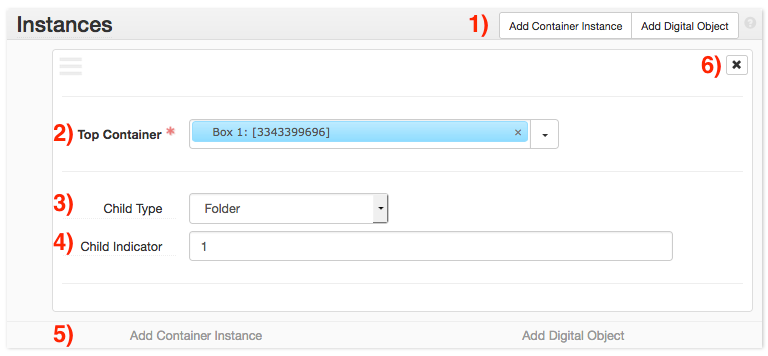
Instance sub-forms can be added by clicking the Add Container Instance button (buttons 1), or its corresponding button at the bottom (buttons 5). Add an Instance sub-form for each container associated with an archival object (e.g. an archival object describing 5 boxes should have 5 Instances).
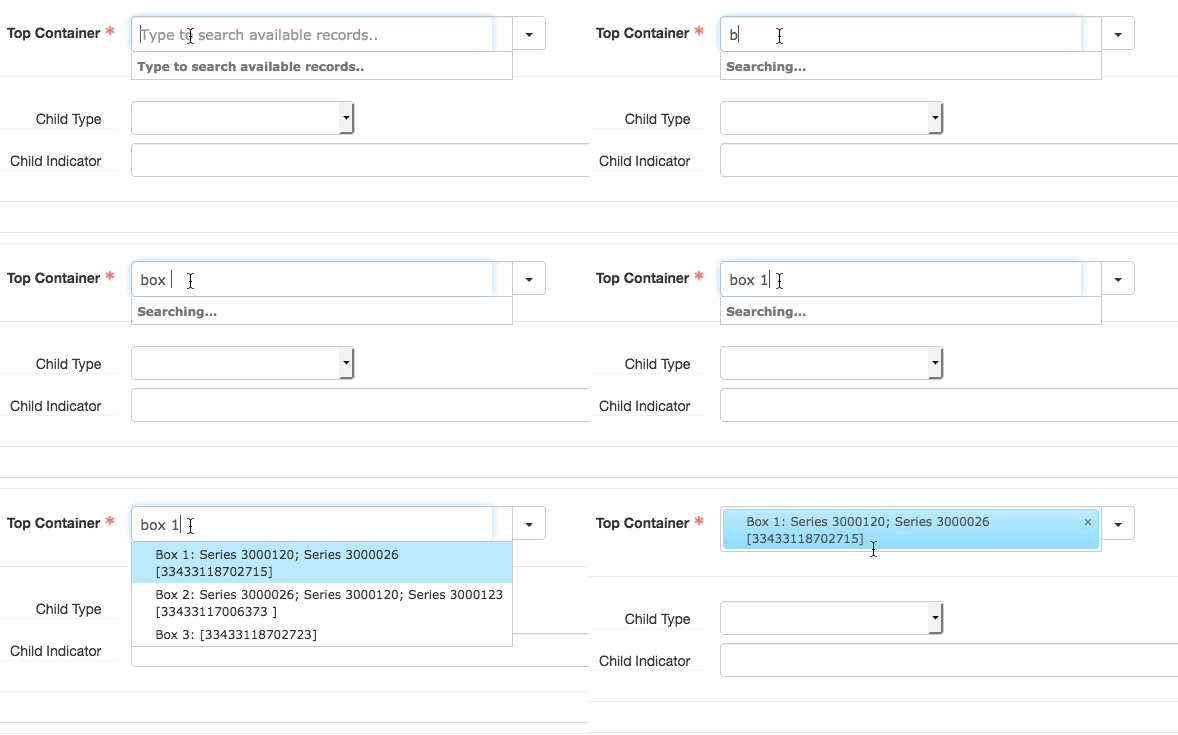
Provide the link to the appropriate container in the Top Container field (field 2). Containers can be searched by typing into the Top Container field (see above). This will only search containers already associated with the collection. If the container does not already exist (or is not already associated with the collection), further options can be found by clicking the triangle to the right of the field. The Create option will bring up a window to create a new container. The Browse option will bring up an advanced search window for finding containers.
If more detailed description of the archival object’s container is needed (for example, if the component represents a range of folders within a box), provide this information in the Child Type and Child Indicator fields. Select the type of child container from the Child Type menu (field 3), and provide its number (or range of numbers) in Child Indicator (field 4). For example, if an archival object describes folders 2-5 in a box, the Child Type would be folder and the Child Indicator would be 2-5.