Container Instances
In ArchivesSpace, a container (or top container) represents a circulating container. Containers in ArchivesSpace are equivalent to objects in SPEC and items in Sierra. Typically, containers will represent boxes, volumes, tubes, and oversized folders.
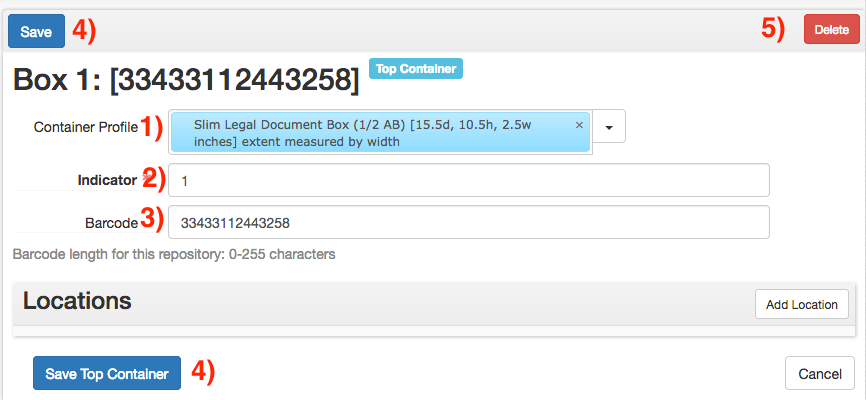
Container Profile
When creating a container record, provide the type of container in the Container Profile field (field 1). Profiles can be searched by entering search terms into the field, or selected via Browse under the arrow to the right of the field. More information on container profiles can be found at the ArchivesSpace Container Profiles list. When selecting a Container Profile for a newly-processed collection, do not select any profile with LEGACY in the name. These profiles should only be selected when working with older collections.
Indicator Field
Provide the number of the box in the Indicator field (field 2).
Barcode
If available at time of processing, provide the barcode in the Barcode field (field 3). Barcodes must be either exactly 14 characters or left empty; the record will not save otherwise._
Save
Containers can be saved via the Save buttons (buttons 4). If the Container form was opened from within a resource or archival object page, this will automatically link the container to that record.
Delete
Existing containers can be deleted via the Delete button (button 5).