Archival Object Description
For details on the use of the Identifiers, Agent Links, Subjects, and Notes sub-forms of the archival object record, please see their corresponding documentation regarding resource records. Use these sub-forms in accordance with NYPL processing guidelines and descriptive best practice.
Table of Contents
Dates
Use the Dates sub-form to describe the dates spanned by the archival object. Refer to DACS 2.4 for instructions on formulating appropriate dates.
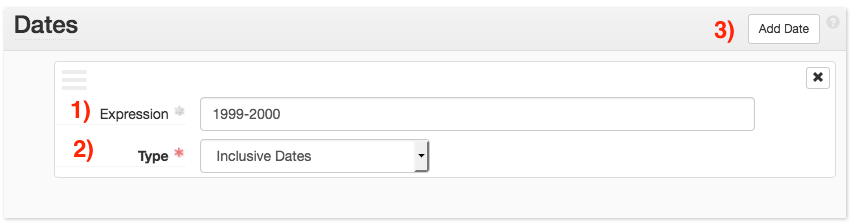
ArchivesSpace allows for multiple date sub-forms. Each sub-form should describe one date or date range.
When creating dates, additional sub-forms can be generated via the Add Date button (button 3.)
Provide the date in the Expression field (field 1).
Select the type of date in the Type menu (field 2). Select bulk for bulk dates and inclusive for all other dates.
Extents
Extents should only be provided for archival objects in the following scenarios:
-
The archival object represents is audio or moving image recording (AMI), and should be extressed as a number and “audio recording” or “moving image recording.”
-
The archival object represents electronic records (ER), and should be described as the number computer files and bytes.
-
The archival object represents a series, and should be described as the number of containers and linear feet.
Electronic Record Extents
When describing electronic records, provide the size of the records in the appropriate magnitude of bytes (kilo/mega/giga) as the Number, and the unit of measurement as Type. Provide the number of computer files in the Container Summary (e.g. 5 computer files).
Audio and Moving Image Extents
When describing audio and moving image recordings at the archival object level, include the Number of recordings and the Type as either audio recording or moving image recording.
For more information on extents, see the Archival Processing Manual section on extents.